

It's a freezing January morning, and you open your app to find your solar storage sitting at 0% while your energy bill climbs. When your system stops performing, the anxiety of rising costs and potential downtime can be overwhelming. Most GivEnergy battery problems stem from simple software glitches or incorrect app settings, but identifying the root cause isn't always straightforward. You shouldn't have to wait weeks for a national helpdesk response while your green energy goes to waste.
This expert guide will help you troubleshoot your system with confidence, ensuring you can distinguish between a quick DIY fix and a hardware failure that requires professional attention. We'll walk you through the most common faults, from firmware updates to inverter communication errors. By the end of this article, you'll have a clear roadmap to restore your battery's performance and keep your home powered efficiently all year round.
Key Takeaways
- Learn how to identify if your solar energy is bypassing storage and what causes sudden drops in your state of charge.
- Discover five simple DIY troubleshooting steps to resolve common GivEnergy battery problems before calling for technical support.
- Understand the critical role of 2026 firmware updates in balancing battery cells and maintaining overall system health.
- Find out how to tell if a fault lies with the inverter rather than the battery and when it's essential to contact a certified professional.
- Explore how regular maintenance and annual inspections can protect your hardware against the local climate to prevent future downtime.
Common GivEnergy Battery Problems: Identifying the Symptoms
Identifying GivEnergy battery problems often feels like detective work. You might notice your solar panels are soaking up the sun, but the battery remains stubbornly at a fixed percentage. This "not charging" scenario is frequently caused by the inverter prioritising home loads or grid exports due to incorrect "Eco" or "Timed" settings in the app. This wastes money. It's frustrating to watch your green energy bypass the storage unit while you continue to pay for grid power. Similarly, if your home pulls from the grid despite having a full battery, the discharge rates or specific time slots might be misconfigured in your portal settings.
What is an SOC Crash?
A State of Charge (SOC) crash occurs when your battery percentage suddenly drops from a healthy level, like 40%, to 0% in just a few minutes. This is usually a calibration issue within the Battery Management System (BMS). The BMS is the internal computer that tracks energy levels. Just like other home energy storage systems, GivEnergy units rely on voltage readings to estimate capacity. If the cells aren't balanced correctly, the software loses track of the actual energy remaining. Extreme cold in Staffordshire can exacerbate this, as low temperatures affect the chemical reactions within the lithium cells. You'll often see the battery LED indicators flashing or showing a single red bar during these calibration events.
Hardware vs. Software: Which is it?
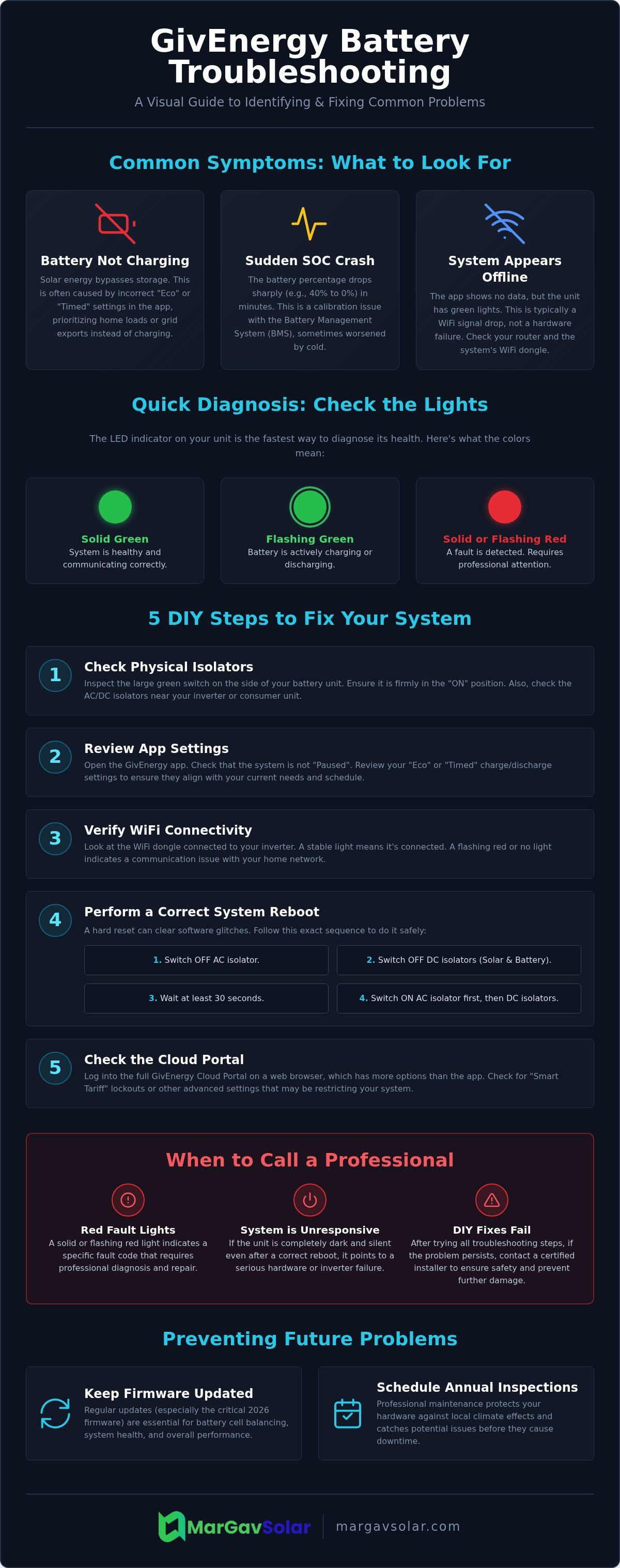
Before assuming a total hardware failure, you need to check the basics. Most issues are software-driven and managed via the GivEnergy Cloud or mobile app. However, physical triggers are common. Check the green isolator switch on the side of the unit. If it has tripped to the "OFF" position, the battery is physically disconnected from the inverter. Understanding the light signals on your unit is the fastest way to diagnose the health of the system:
- Solid Green Light: The system is healthy and communicating.
- Flashing Green: The battery is charging or discharging normally.
- Solid or Flashing Red: This indicates a fault code that requires professional attention.
MarGav Solar's team has spent 20 years managing these nuances. We often find that "system offline" messages in the app are simply WiFi signal drops rather than a dead battery. If the LEDs are green but the app is dark, it's a connectivity problem. If the unit is silent and dark, it's likely a hardware trip or a deeper inverter issue that requires a specialist's touch.
DIY Troubleshooting: 5 Steps to Fix Your GivEnergy System
Many GivEnergy battery problems don't require a technician. Often, the solution is as simple as toggling a digital switch or flicking a physical one. Start by inspecting the physical battery isolator, which is the large green switch on the side of your unit. If this has tripped or been accidentally knocked to the "OFF" position, your battery is effectively invisible to the rest of your home. If the hardware looks correct, move to your digital dashboard. Check the "Pause" status in the GivEnergy App or Cloud Portal; it's surprisingly common for users to inadvertently pause charging or discharging while exploring settings.
Next, look at your "Eco" or "Timed" modes. If you've set a specific discharge window that has already passed, the system will sit idle to preserve energy for your next scheduled slot. This often happens after a clocks-change or a firmware update that resets local time settings. Similarly, check your WiFi dongle. If the signal strength is low or the dongle is flashing red, your system isn't broken, it just can't talk to the cloud. If these quick checks don't work, a full system restart is your next move. For more complex issues, booking professional solar maintenance ensures your system is correctly configured for local Staffordshire conditions.
The Correct Reboot Sequence
A hard reset clears temporary software glitches that cause communication lag between the battery and the inverter. Don't just flick switches at random. Follow this specific sequence to ensure the capacitors discharge safely:
- Step 1: Switch off the AC isolator, which is usually found near your consumer unit or inverter.
- Step 2: Turn off the DC isolators for both the solar panels and the battery unit.
- Step 3: Wait for at least 30 seconds. This allows the internal components to fully lose power.
- Step 4: Turn the AC isolator back on first, followed by the DC isolators to complete the restart.
Checking App and Portal Settings
The GivEnergy Cloud Portal offers deeper controls than the mobile app. Log in and look for the "Remote Control" cog icon. Here, you can identify "Smart Tariff" lockouts. If you're on a dynamic pricing plan, the software might override your manual preferences to prevent charging during peak price spikes. To fix the most common digital block, navigate to the battery settings and ensure the "Pause Battery" toggle is set to "OFF" to allow normal operation.
Firmware Updates and Software Glitches
Software is the invisible engine behind your home energy storage. While physical components are robust, many GivEnergy battery problems actually originate in the firmware that manages the lithium cells. By 2026, firmware updates have become even more critical for cell balancing. This process ensures that every individual cell within your battery pack charges and discharges at the same rate. Without these regular software refinements, you might experience the sudden state of charge drops mentioned earlier. You can check your current firmware version by logging into the GivEnergy Portal and navigating to the "Inverter" or "Battery" tabs. If your version number doesn't match the latest release, your system may be running on inefficient, outdated logic.
Updating your system isn't without risk. If a WiFi connection drops or power is cut during a firmware flash, you risk "bricking" the system. This term describes a unit that becomes completely unresponsive because its internal instructions were corrupted. MarGav Solar leverages 20 years of renewable energy expertise to manage these risks for our Staffordshire clients. As NICEIC-certified installers, we provide remote diagnostics to ensure updates are applied safely. If a system gets stuck during a cycle, we can often resolve the issue via the cloud before it requires a physical site visit, saving you time and avoiding system downtime during the winter months.
Automatic vs. Manual Updates
GivEnergy frequently pushes global updates to improve system stability and security. Most users will receive these automatically through the GivEnergy Cloud without needing to lift a finger. However, some systems may fall out of sync with the global rollout due to local connectivity issues. In these cases, a manual "push" from a qualified engineer is required. This manual intervention allows us to target specific faults or recalibrate the Battery Management System (BMS) if it has lost its baseline. A stable cloud connection is the backbone of this process; without it, your battery cannot receive the optimizations it needs to handle Staffordshire's varied climate.
Resolving App Sync Issues
It's common to see a mismatch where your mobile app shows 60% charge while the web portal shows 55%. This is usually a data latency issue rather than a hardware fault. If your app feels "frozen" or out of date, start by clearing the app cache in your phone settings and re-pairing your WiFi dongle. For the most reliable experience, we recommend using a hardwired Ethernet connection. Many Staffordshire homes have thick brick walls that degrade WiFi signals, leading to frequent "system offline" alerts. A physical cable removes this variable, ensuring your app data is always live and accurate.
When to Call a Professional: Safety and Hardware Faults
While most GivEnergy battery problems can be fixed with a quick reboot or a settings tweak, some situations demand immediate professional intervention. Safety is the priority. If you detect a "thermal event", indicated by a strong chemical smell, smoke, or excessive heat radiating from the casing, stay away from the unit. Don't attempt to switch it off if it feels unsafe. These events are rare, but they require an engineer's expertise to manage safely. Similarly, if you see physical damage like a cracked casing or leaking fluid, the battery must be isolated by a professional immediately.
Often, what looks like a battery failure is actually an issue with the inverter. The inverter acts as the brain of the system; if it fails, the battery cannot communicate or distribute power. Physical signs of trouble include unusual loud humming noises or the casing feeling hot to the touch. If your system is ageing and showing persistent errors, it might be time to look into Inverter Upgrades in Staffordshire to ensure your ROI remains high. MarGav Solar's NICEIC-certified installers bring 20 years of renewable energy expertise to your doorstep, diagnosing internal electrical faults that software alone cannot detect.
Waiting for a national helpdesk can take weeks, leaving you reliant on the grid during peak winter months. A local Staffordshire presence allows for a much faster response. We can identify if a fault is a simple communication error or a deeper hardware failure that requires a warranty claim. If you're worried about your system's safety or performance, contact our expert team for a professional diagnostic visit to get your home back to self-sufficiency.
Signs of Inverter Failure
Your inverter displays specific fault codes that indicate hardware distress. If you see codes related to "Relay Fault," "DC Injection," or "Ground Fault," these are internal electrical issues. These aren't settings you can change in the app; they often point to worn components or environmental damage. Our team specialises in inverter upgrades and replacements, ensuring that if the "brain" of your solar setup has failed, we can get your storage back online quickly. Staffordshire's damp climate can sometimes affect outdoor-mounted inverters, making professional sealing and annual inspections vital for system longevity.
The Professional Calibration Process
Professional calibration is a deep-level reset of the Battery Management System. Unlike a standard homeowner reboot, this process involves forcing a "deep charge" to a specific voltage level. This resets the battery's "memory" and ensures the software accurately reflects the physical energy stored. Engineers also check for cell voltage imbalances during this visit. If one cell is significantly weaker than the others, it can drag down the performance of the entire pack. A DIY restart won't fix this; it requires precision tools to identify and balance the internal voltages to prevent future GivEnergy battery problems.
Preventing GivEnergy Problems with Regular Maintenance
Staffordshire’s damp winters and humid summers place unique stress on renewable energy hardware. While these systems are built for endurance, neglecting basic upkeep is a leading cause of persistent GivEnergy battery problems. Outdoor-mounted units are particularly vulnerable to temperature fluctuations that can cause internal condensation or cable degradation over time. By scheduling an annual inspection, you ensure that small issues, like a loosening connection or a slight firmware lag, don't escalate into a total system shutdown during a cold snap. Our 20 years of experience shows that proactive care is always cheaper than emergency repairs.
Maintenance isn't just about the battery itself; it’s about the entire ecosystem. If your panels are covered in grime or blocked by nesting birds, your generation drops, leaving the battery unable to reach a full charge. This constant under-charging often leads to the calibration errors and SOC drops we discussed earlier in this guide. Bird-proofing and professional cleaning prevent these external factors from throttling your storage potential. Furthermore, regular checks ensure your installation remains compliant with the latest NICEIC safety standards, which is essential for both your insurance and your peace of mind.
Local Maintenance in Staffordshire
Local expertise is vital when it comes to Solar Panel Maintenance. A technician who understands the local environment can spot signs of wear that a remote helpdesk would miss. At MarGav Solar, we've spent two decades installing and maintaining systems across the county. A typical 2026 maintenance visit includes a full electrical safety check, a firmware audit to match the latest 2026 versioning trends, and a physical inspection of all isolators and cabling. Having a local contact means you aren't just a ticket number in a queue; you have a specialist who knows your specific installation and can respond quickly if a fault occurs.
Long-term Battery Health Tips
You can significantly extend your unit's lifespan by adjusting how it handles daily cycles. Avoid letting your system hit 0% charge frequently, as deep discharges can stress the lithium cells and trigger communication errors. We recommend setting a "Reserve" level of at least 10% in your app settings to ensure the Battery Management System always has enough power to stay active. It's also important to optimise your Solar Battery Storage for the winter months by adjusting discharge times to match your peak evening usage. If you haven't had your system inspected recently, you should Book a GivEnergy health check with MarGav Solar to ensure your hardware is ready for the year ahead.
Restore Your Solar Independence
Most GivEnergy battery problems are solvable when you understand the balance between digital settings and physical hardware health. Whether you're adjusting your "Eco" modes or performing a timed system reboot, taking these proactive steps ensures your solar investment continues to lower your energy bills. While software tweaks often fix communication lags, remember that complex inverter faults or safety concerns always require a qualified technician to prevent hardware damage.
Maintaining your system against the Staffordshire climate doesn't have to be a solo effort. Our NICEIC-certified installers use over 20 years of renewable energy expertise to provide rapid, local support that national helpdesks simply can't match. If your system is still underperforming after trying the basic troubleshooting steps, our local response team is ready to help.
Get Expert GivEnergy Support in Staffordshire from MarGav Solar and ensure your home remains powered efficiently all year round. Your journey toward a reliable, self-sufficient energy future is well within reach.
Frequently Asked Questions
Why is my GivEnergy battery showing 0% but isn't charging?
This is often caused by a State of Charge (SOC) crash where the Battery Management System loses its internal calibration. It can also happen if your app settings are set to "Pause" or if your solar generation is currently prioritizing your home’s direct electricity needs. Addressing these common GivEnergy battery problems usually starts with checking your GivEnergy Cloud settings to ensure no software locks are preventing the charge cycle from starting or discharging to your home.
Can I reset my GivEnergy battery myself?
You can perform a basic system reboot by following a specific shutdown sequence to clear temporary software glitches. Turn off the AC isolator first, then the DC isolators for both the battery and the solar panels. Wait for at least 30 seconds to allow all internal capacitors to fully discharge before switching them back on in the same order. This often clears minor communication lags that make the system appear unresponsive in your mobile app.
How do I update the firmware on my GivEnergy inverter?
Firmware updates are typically pushed automatically via the GivEnergy Cloud Portal without requiring any user intervention. You don't usually need to do this manually, but you can check your current version in the settings tab of the portal. If you suspect your system is running on outdated software, a certified engineer can remotely push a manual update to ensure your system remains stable and efficient during the 2026 update cycles.
What does a red light on my GivEnergy battery mean?
A red light indicates that the system has detected a fault code that requires immediate attention. This could range from a temporary communication glitch between the inverter and battery to a physical hardware trip that has disconnected the unit. Check your mobile app for specific error notifications to see what the system is reporting. If the red light persists after a full system reboot, it is time to contact a professional for a deeper diagnostic check.
Is it normal for my solar battery to be idle during the day?
It is perfectly normal for a battery to sit idle if your solar panels are providing exactly enough power to cover your home's current demand. The system prioritizes powering your appliances first before sending excess energy to the storage unit. If the battery is already at 100% or your "Eco" settings are configured to prioritize grid export, the battery will remain in standby mode until the sun goes down.
How often should I have my GivEnergy system professionally serviced?
We recommend a professional inspection once every year to maintain optimal system health and safety. Our NICEIC-certified installers check for cable wear, update firmware safely, and recalibrate the battery cells to prevent capacity loss. Regular maintenance is especially important in Staffordshire to ensure that outdoor components are still weather-sealed and performing correctly after a harsh winter season, protecting your 20-year investment in renewable energy.
Does cold weather affect my GivEnergy battery performance in Staffordshire?
Cold weather can significantly impact how quickly your battery charges and discharges during the winter months. Lithium-ion cells are sensitive to low temperatures, and the internal software may limit performance to protect the hardware from permanent damage. If your battery is installed in a garage or on an external wall, you might notice slower response times or a slightly reduced capacity during the peak of a Staffordshire cold snap.
What should I do if the GivEnergy app is not showing any data?
Check your WiFi dongle's status lights first to see if your system is still connected to your home network. If the dongle is flashing red or is completely dark, your system is likely offline due to a router issue or a weak signal. You can often fix this by unplugging the dongle for ten seconds and plugging it back in or by switching to a hardwired Ethernet connection for much better reliability.


