

What if your solar panels are still generating, but the monitoring app has stopped reporting data? When output suddenly drops or an inverter displays an unfamiliar warning, it’s natural to wonder what to do if my solar system stops working. A blank app, a generation fault and a problem with your home’s electricity supply are not necessarily the same issue.
It’s easy to assume the panels have failed, especially when you can’t see what’s happening on the roof. Before you worry, make a few safe checks from the ground and around your home. You don’t need to open equipment or attempt electrical repairs.
This guide explains how to distinguish a monitoring problem from a likely generation fault, which checks are safe and when to contact an installer. It also explains what to note, including the inverter’s status and when the app last updated, so a professional can assess the issue. For Staffordshire homeowners, MarGav Solar provides residential solar maintenance, repair and inverter replacement. An inspection can help establish what the system needs.
Key Takeaways
- To work out what to do if my solar system stops working, compare the app’s latest update with the inverter’s visible status before assuming generation has stopped.
- Match the symptom, such as an offline app, warning light or low output, to the next safe check instead of guessing which component has failed.
- Use your system manual to confirm which external checks are permitted. Don’t open electrical enclosures, handle wiring or climb onto the roof.
- Record warning messages, status lights and when the problem began so an installer can assess the issue with useful details.
- Persistent zero generation, repeated warnings or visible damage call for professional assessment. Staffordshire homeowners can ask a solar professional to inspect the system and recommend next steps.
What does it mean when your solar system stops working?
No production in your monitoring app can be alarming, but it doesn’t automatically mean your panels have stopped generating electricity. A solar system stoppage can mean no generation, lower than usual output, an inverter that has shut down, or monitoring that has stopped updating. These situations can look similar on a screen, even though their causes and next steps may differ.
A typical photovoltaic system uses panels to produce electricity and an inverter to convert it for use in the home. If the inverter display shows production while the app reports none, the issue may be with communication or reporting rather than generation. A monitoring outage isn’t proof of a generation fault. Check another available system reading before drawing conclusions.
Solar output also changes naturally. Generation is generally lower in dull weather and during the shorter UK winter days than in bright summer conditions. Shade, time of day, household electricity use and system configuration can also affect what you see. A low reading alone doesn’t confirm a fault. If you’re deciding what to do if my solar system stops working, first establish whether information is missing, output is reduced or the system appears to have stopped altogether.
How can you tell whether your solar panels have stopped generating?
Compare the app’s current reading with the inverter display or monitoring history, if available. Consider the time of day and weather before treating a low figure as a fault: output can be modest under heavy cloud or early in the morning. Look for a pattern rather than relying on one snapshot. Repeated zero readings during suitable daylight conditions are a useful reason to investigate further and record what you see.
Is the problem the solar system or just the monitoring app?
Check the app’s status and the time of its last update. “Offline” or stale data may point to a reporting interruption, while an equipment alert may mean the system needs attention. Compare the app with an accessible inverter display, but don’t remove covers or touch wiring. If the readings disagree, note the message and when it appeared. A communications problem can interrupt reporting even while the system continues to generate electricity.
Why might a solar system stop producing electricity?
A low or missing reading can have several explanations, and the display alone may not identify the cause. An inverter alert, an isolation switch that appears to be off, a monitoring connection problem or an interruption to the home’s electricity supply could all be relevant. These are possibilities, not diagnoses. Equipment and system layouts differ, so check any alert or status against the manufacturer’s instructions.
Solar panels produce electricity from sunlight. The Solar Energy Industries Association explains how photovoltaic devices generate electricity, but the amount available varies with conditions. Cloud, short winter days or shade from a tree or nearby structure can reduce output without proving a fault. Visible dirt or debris may also affect performance, but it is not a reason to climb onto the roof or try to clean the panels yourself.
Could the inverter or electricity supply be responsible?
An inverter’s status message or warning code can help indicate what to check next. Note the exact wording or code and when it appeared, then consult the system manual or contact your installer. Don’t repeatedly reset equipment or change settings to clear an alert. Grid or household supply conditions may also affect system operation. If you suspect a wider power interruption, contact your electricity provider as appropriate and ask your installer about solar specific messages.
Can weather, shading, or dirt make solar output look faulty?
Output naturally varies with daylight, weather and season, and temporary shade can lower generation at particular times. If you can see debris from the ground, treat it as a reason to seek suitable maintenance advice, not to access the roof. For context on safe upkeep, read about solar panel maintenance and cleaning. These factors may explain reduced output, but persistent or unusual readings still need equipment specific checks.
Other visible clues can help you explain the problem: whether the inverter screen is on, whether it shows a warning and whether the app’s last update coincides with a change in output. Don’t assume a particular component has failed based on one symptom. If you’re working out what to do if my solar system stops working, record what you observe and ask a qualified solar professional to assess the system when safe checks don’t explain the issue.
Staffordshire homeowners seeking a professional assessment can find out more about solar maintenance and repair from MarGav Solar. An inspection can help establish what’s happening before any repair or replacement is recommended.
What should you check before deciding the system needs repair?
Use what you can observe to decide what information to gather, not to diagnose a component. Systems and controls vary, so follow the manual for your specific equipment. Don’t remove covers, touch wiring or attempt electrical repairs. This comparison can help you work out what to do if my solar system stops working:
| What you notice | Safe observation | When to involve a professional |
|---|---|---|
| App offline or data missing | Note the last successful update and check whether other internet-connected devices at home are online. Compare the app with an accessible inverter display, if available. | Ask your installer or the app provider for guidance if data remains unavailable or the readings don’t match. |
| Inverter alert or unusual light | Record the exact message or code, indicator pattern and time. Check the relevant manual for that model. | Contact a qualified solar professional if the alert persists, returns or the manual directs you to seek assistance. |
| Output lower than expected | Note the time, weather and recent readings. Consider whether the conditions differ from the period you’re comparing against. | Seek an assessment if output remains unexpectedly low and the manual or normal conditions don’t explain it. |
| System appears completely shut down | From a safe position, note whether the inverter display is on and whether there’s a household supply interruption. | Don’t open equipment or repeatedly reset it. Contact your installer or relevant electricity provider, depending on what you observe. |
What do common inverter lights and messages mean?
There’s no universal meaning for a particular colour, code or flashing pattern. The same indicator can mean different things on different models. Write down the exact message, pattern and time, then consult the manual or manufacturer guidance for that specific inverter. An alert code is useful evidence, not a remote diagnosis. Share it with the installer instead of guessing at the cause or trying repeated resets.
When is it a monitoring or connectivity problem instead?
If other devices can’t connect to your home internet either, the issue may involve the network rather than the solar equipment. If they work normally, that still doesn’t prove where the fault lies, but the app may have lost its connection or stopped receiving data. Record when it last updated and compare that with any accessible inverter information. If your original installer is no longer available, guidance on finding support if your solar installer goes out of business may help you plan your next step.
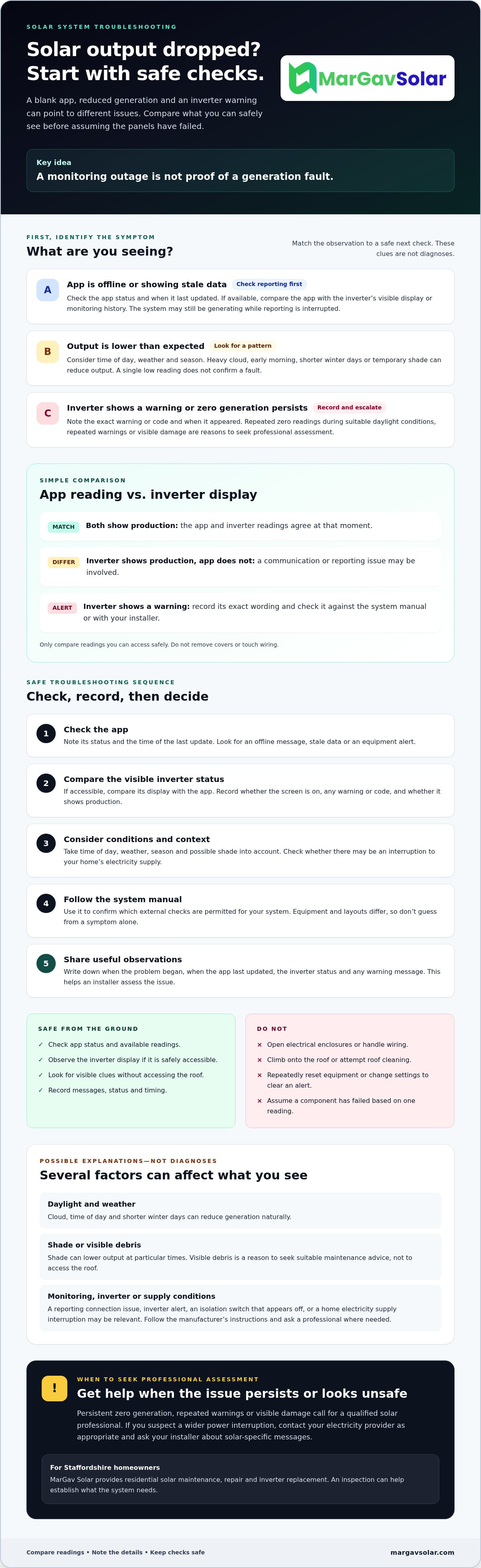
How to troubleshoot a solar system safely, step by step
If you’re asking what to do if my solar system stops working, limit your checks to observations you can make safely. The aim is to gather useful information, not repair electrical equipment yourself. System layouts and manufacturer instructions differ, so use your own manual as the guide for any checks it permits.
- Observe from a safe position. Check the monitoring app and any visible inverter display or status indicators. Note whether the app is offline, shows a warning, or reports low or zero output.
- Record what you see. Write down the time, any message or code, and whether the display appears to be on. Save app screenshots if useful. Note recent weather or a household power interruption that may relate to the change.
- Consult the system manual. Look up the exact equipment model and its instructions for the message or status shown. Don’t assume a light or code means the same thing across different systems.
- Make only permitted external checks. Follow the manual for checks it allows without opening equipment. You can look for obvious obstructions from ground level, but don’t climb onto the roof to inspect or clean panels.
- Escalate if the cause remains unclear. Contact your installer or a qualified solar professional with your notes. They can assess the equipment and recommend next steps.
Never open electrical enclosures, handle wiring or attempt internal repairs. Don’t switch equipment or change settings unless the instructions for your system specifically permit it. A solar installation guide can also help you understand the roles of panels, an inverter and other system components, but it isn’t a substitute for equipment specific troubleshooting instructions.
Which checks can a homeowner do without opening equipment?
Check whether the app is updating, read the visible display and note accessible status indicators without removing covers. From the ground, look for obvious changes such as new shading or debris. Stop there. If the manual doesn’t clearly permit a check, leave it to a professional rather than testing switches or touching cables.
What information should you collect before contacting an installer?
Gather the inverter make and model, any exact error code and when the problem began. Save relevant app screenshots and note recent weather or power interruptions. Describe visible changes from a safe distance, but don’t touch damaged equipment.
Stop and seek professional help if you see damage, notice a burning smell or unusual heat, or have any other safety concern. For an assessment of an existing solar system, contact MarGav Solar about solar maintenance and repair in Staffordshire.
When should you call a solar repair professional in Staffordshire?
Arrange a professional assessment if generation remains at zero during suitable daylight conditions, inverter warnings keep returning or you can see damage. Stop troubleshooting if you notice a burning smell, unusual heat or another safety concern. Don’t touch damaged equipment or attempt a repair. A qualified solar professional can inspect the system, check its documentation and establish whether the issue involves monitoring, the inverter or another part of the installation.
If you’re unsure what to do if my solar system stops working, you don’t need to identify the fault yourself. Share what you’ve observed and ask an installer familiar with solar PV systems to assess the equipment before recommending a repair or replacement.
Should you repair, replace, or upgrade an inverter?
Make that decision after diagnosis, not before it. An alert or shutdown doesn’t automatically mean the inverter needs replacing. The system’s age, the inverter’s condition, compatibility with the rest of the installation and the inspection findings can all shape the recommendation. If an assessment raises the possibility of an upgrade, consult a dedicated inverter upgrade guide for further context instead of assuming an upgrade is the right fix.
How can Staffordshire homeowners prepare for a service visit?
Gather your system paperwork and installation details, along with the inverter make and model, alert codes and monitoring screenshots. Note when the problem began and any changes you’ve noticed. Before arranging a visit, ask what the inspection will cover and whether the professional can assess your existing equipment and its documentation.
MarGav Solar provides residential solar maintenance, repair, and inverter upgrades and replacements for customers in Staffordshire. With more than 20 years of industry experience, the company can assess an existing installation before advising on next steps. Contact MarGav Solar to discuss a maintenance or repair enquiry and confirm current service availability in your area. A clear inspection can help replace guesswork with a better understanding of what the system needs.
Take the next step with confidence
If you’re unsure what to do if my solar system stops working, start by separating a monitoring issue from a likely generation fault. Compare available app and inverter information, note any warnings and follow only checks permitted by your system manual. If zero generation persists, alerts repeat or you spot damage, leave further investigation to a professional.
For homeowners in Staffordshire, MarGav Solar provides solar PV maintenance, repair and inverter replacement, with more than 20 years of industry experience. A professional inspection can help establish what’s happening before repair or replacement is recommended. Confirm service availability for your specific address.
Contact MarGav Solar about a solar system inspection to discuss your system and possible next steps. With useful information and a qualified assessment, you can move forward calmly and safely.
Frequently Asked Questions
What should I do first if my solar system stops working?
Start with safe observations, not repairs. Check whether the monitoring app has updated, then compare its reading with any accessible inverter display. Note the time, output, status message and any recent power interruption. Consult your system manual before touching switches or changing settings, and don’t open equipment, handle wiring or climb onto the roof. If readings stay at zero in suitable daylight or an alert persists, contact a solar professional.
Can solar panels stop working because of cloudy weather?
Cloudy weather can reduce solar generation, but a low reading during dull conditions doesn’t by itself show that the panels have stopped working. Output also varies with daylight hours, season and shading. Compare readings under similar conditions where possible, and look for a repeated pattern rather than judging from a single moment. If zero output continues during suitable daylight, check the inverter status and seek professional advice if you can’t explain it safely.
Why is my solar app showing no data?
No app data can mean the monitoring connection has stopped updating, not necessarily that the system has stopped generating. Check the app’s last update time and whether other internet-connected devices at home are working. If there’s an accessible inverter display, compare its information with the app without removing covers. Save a screenshot and note any status message. If the data remains missing or readings conflict, contact your installer or the monitoring provider for guidance.
Is it safe to reset my solar inverter?
Only follow a reset procedure if the manual for your specific inverter explicitly allows it and explains how to do so safely. Equipment and instructions differ, so don’t rely on generic online steps or repeatedly switch the inverter off and on. Never open its casing or touch wiring. If there’s visible damage, unusual heat, a burning smell or an unfamiliar warning, leave the equipment alone and contact a solar professional.
How do I know if my solar inverter has failed?
You can’t confirm inverter failure from an app reading or warning light alone. Persistent zero generation, a blank display or repeated alerts may indicate a problem, but other causes, including monitoring or supply issues, can look similar. Note the inverter’s make and model, the exact message and when it appeared, then check its manual. A solar professional can inspect the system and determine whether the inverter or another part needs attention.
Should I clean my solar panels if the system is not producing electricity?
Don’t climb onto the roof or try to clean panels as a first response to zero generation. Dirt or debris may affect output, but it doesn’t prove that soiling is the cause of a complete stoppage. From the ground, note any obvious obstruction and ask a solar maintenance professional for suitable advice. Check the app and inverter status too, since an alert or monitoring issue may need a different response.
When should I call a solar panel repair company?
Contact a solar repair professional if zero generation persists in suitable daylight, inverter warnings keep returning, safe checks don’t explain the problem or you notice visible damage. Don’t touch damaged equipment. Staffordshire homeowners can contact MarGav Solar about solar PV maintenance, repair or inverter replacement. The company has more than 20 years of industry experience. Confirm that service is available for your specific address, and have system details and recorded alerts ready.


